
Better yet accessible :focus
A simple way to make a good looking and accessible focus style

I am a full-stack web application developer, having more than 10 years of extensive experience in all phases of small-scale to enterprise-scale projects. I have ample knowledge of various domains including Web Design Systems, Learning Management Systems (e-learning), and Resource Management Systems.
I have been leading project teams for more than 5 years and have proudly delivered numerous successful projects. I have extensive experience in handling client-facing communications and meetings both remotely and in-person.
I believe in team success & growth, hence I always put my best efforts to build & maintain a strong team bonding for every project I get to work on.
Every element of your app that is interactive or needs to be highlighted, should have tabbing focus indicator.
By default, all browsers render an outline as a focus indicator BUT that is different per browser.
As an example, this is how Chrome, Firefox, and Safari will set focus on the same element.
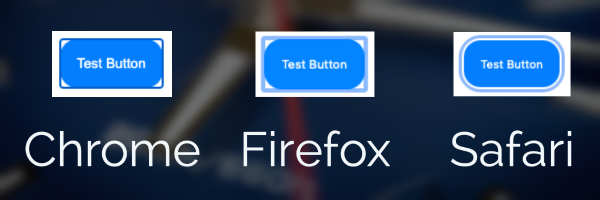
Although every browser renders an outline, the color of that outline might not work well with your app theme or may not be prominently visible to your users.
🛑 This is not a good UX and it should be fixed!
The good news is that we can improve it with CSS. Let's see how.
The following rule will apply a solid blue outline of 2px to all focused elements on your page.
*:focus {
    outline: #007EFF solid 2px;
}
You can change the color based on your app theme or even for a section of the app by using more specific selectors.
But wait, there is more!
The outline will always have corners regardless of the shape of the element. You might want to make it look better and follow the shape of the element.
The following snippet comes to the rescue:
*:focus {
    outline: transparent solid 2px;
    box-shadow: 0 0 0 2px #fff, 0 0 0 4px #007EFF;
}
This is the same button after a pinch of precise CSS (as Darshan Satya says).
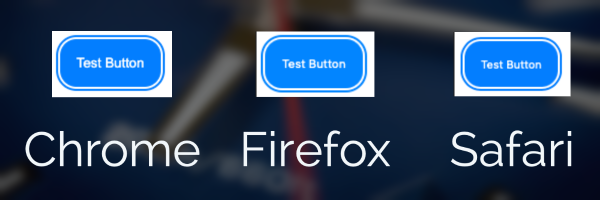
You must be wondering why do we have a transparent outline and a colored box-shadow.
Well, the fact of the matter is that box-shadow is not visible in Windows High Contrast mode, and we need the outline so the transparent color can be overridden and used by the OS.
I hope you liked this tip and I will love to hear your feedback.
Happy coding!


